Architecture & Security Model
Last updated 1 week ago
Overview
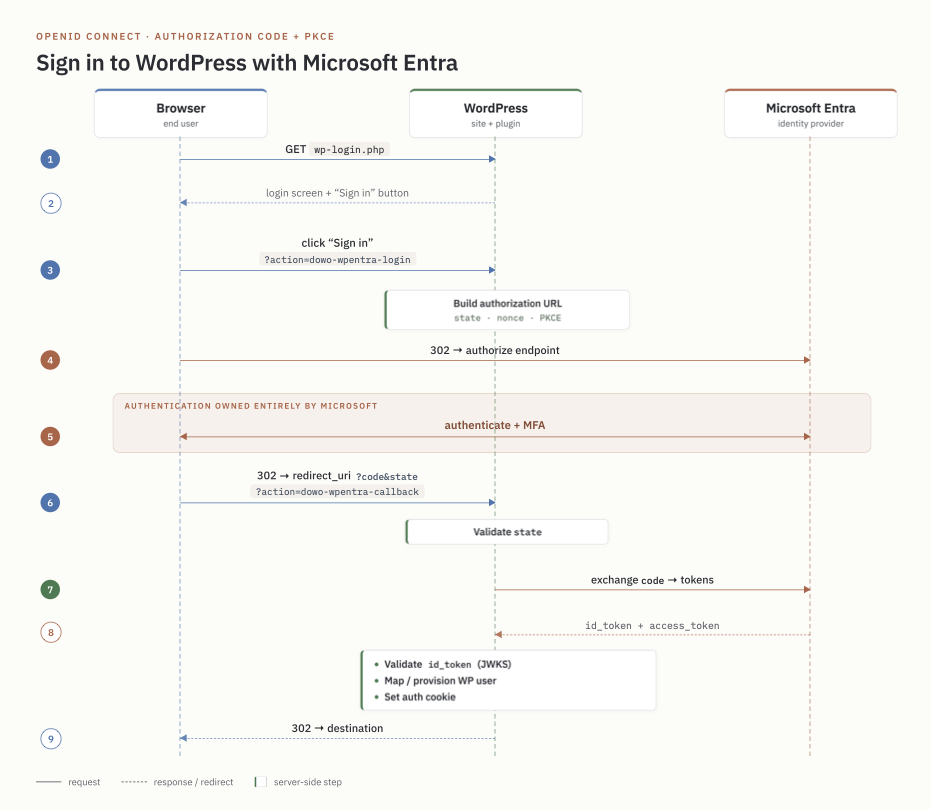
The plugin implements the OpenID Connect Authorization Code flow with PKCE against the Microsoft identity platform v2.0 endpoints. It bridges a successful Entra sign-in to a WordPress session.
Components
| File | Responsibility |
|---|---|
dowo-wpentra-login.php |
Bootstrap, constants, activation/deactivation hooks. |
includes/class-dowo-wpentra-login.php |
Wires the components together and registers hooks. |
includes/class-dowo-wpentra-settings.php |
Settings storage, defaults, and the admin UI. |
includes/class-dowo-wpentra-oidc.php |
Discovery, authorization URL, code exchange, and ID-token validation. |
includes/class-dowo-wpentra-auth.php |
Login initiation, callback handling, user mapping and provisioning. |
includes/class-dowo-wpentra-login-ui.php |
The Microsoft button and hiding/revealing the local form. |
includes/class-dowo-wpentra-local-access.php |
Per-account local-login allow-list: enforcement, profile UI, activation seeding. |
uninstall.php |
Removes options, transients, and user link meta on uninstall. |
Endpoints used
The plugin reads the tenant's discovery document at
https://login.microsoftonline.com/{tenant}/v2.0/.well-known/openid-configuration
and uses the authorization_endpoint, token_endpoint, jwks_uri, and
issuer it advertises. The discovery document and signing keys (JWKS) are cached
in WordPress transients (12 hours and 6 hours respectively).
Two plugin "actions" hang off wp-login.php:
wp-login.php?action=dowo-wpentra-login— starts the flow.wp-login.php?action=dowo-wpentra-callback— the registered redirect URI.
These map to login_form_{action} hooks, the standard WordPress extension point
for custom login actions.
Security model
CSRF / replay protection
- A random
statevalue is generated per request and stored server-side in a short-lived transient (10 minutes). The callback only proceeds if the returnedstatematches a stored context, which is then consumed (single use). - The flow is bound to the browser that started it: a random token is set as
a short-lived
HttpOnly,SameSite=Laxcookie (dowo_wpentra_flow) and its SHA-256 hash stored in the context. The callback is refused – and the context burned – unless the cookie matches, so a captured callback URL cannot log a different browser in (login CSRF). - A random
nonceis generated, sent in the authorization request, and verified against thenonceclaim in the returned ID token. - PKCE (S256) is used: a per-request code verifier is stored server-side and its challenge is sent to Entra, binding the authorization code to this client.
Token validation
The ID token is validated before any user is signed in:
- Signature: RS256 verified against the tenant JWKS. The RSA public key is
reconstructed from the JWK modulus/exponent into a PEM key and checked with
openssl_verify(). Keys are refetched once on a key-ID miss to handle rotation. - Audience (
aud): must equal the configured client ID. - Tenant (
tid): must equal the configured tenant GUID; multi-tenant authorities are not accepted as a tenant ID. - Issuer (
iss): must match the discovery document's issuer, with the configured tenant ID substituted for{tenantid}(never the token's own). - Expiry (
exp) / not-before (nbf): checked with a small clock-skew leeway. - Nonce: compared with
hash_equals().
The authorization code is exchanged for tokens over a back-channel server-to-server HTTPS request that includes the client secret, so tokens are never exposed to the browser.
Account binding
The WordPress user is located by the Entra oid stored in user meta
(dowo_wpentra_oid); email is consulted only for an account not yet bound, and
an email match against an account bound to a different oid is refused. This
keeps a mutable or unverified email claim from reaching someone else's account.
Sessions
On success the plugin calls wp_set_auth_cookie() and fires the standard
wp_login action, so the resulting session is indistinguishable from a normal
WordPress login and works with other plugins.
Local Login
Hiding the local form is a usability/obscurity feature. The genuine control is
the local-login restriction: a wp_authenticate_user filter (priority 30)
rejects password logins for any account lacking the dowo_wpentra_allow_local
flag, once SSO is enabled. SSO logins bypass this filter entirely. Enforcement is
suppressed until SSO is configured, and an admin notice warns if no account is
allowed, to prevent lockout. See LOCAL-LOGIN.md.
Why MFA is not in the plugin
MFA, passwordless, device compliance, and risk policies are all enforced by Microsoft during the authorization step. The plugin only ever sees a signed token representing a fully authenticated user, so there is no MFA logic — or MFA secret — in WordPress. See MFA.md.